
Linksys officially rolled HomeKit Secure Router support to its Velop AX4200 WiFi 6 System. Additionally the Wi-FI 6 system is also available Apple and will be stocked in Apple Stores worldwide.
The company had previously rolled out HomeKit support for its AC and WH range back in September 2020. I then followed this up with a review of the AC6600 and go in-depth into how HomeKit Secure Router support works. But essentially HomeKit Secure Router adds provides an extra layer of protection over HomeKit accessories. This means you can firewall off HomeKit devices from speaking to the outside world.
The Velop AX4200 WiFi 6 System, available in 1-pack, 2-pack or 3-pack options for scalable coverage, combines the benefits of WiFi 6 with Linksys Velop Intelligent Mesh™ Technology to deliver true gigabit WiFi speeds to every corner of the home.
Getting started
Setup starts within the Linksys app by tapping the button in the upper left corner of the app. Scrolling to the bottom you find an option called ‘Apple Home Integration.’ This option starts the process for HomeKit integration with an alert confirming that you want to begin setup. You are then prompted to allow access to your HomeKit data, which is important for everything to work correctly.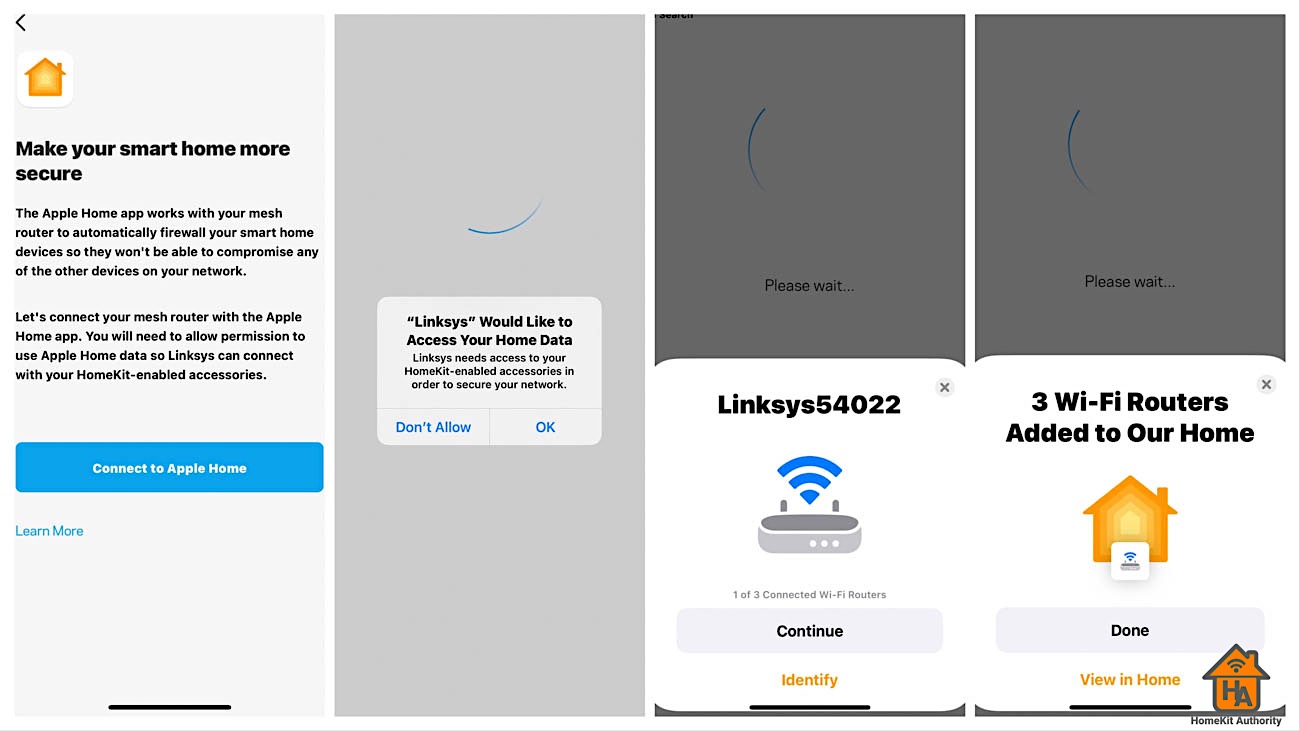
The next part of the setup is like adding any other HomeKit accessory to your setup. This process will take you through adding each router. When first setting up each device it uses the naming convention “Linksys” and a series of numbers. So it may be a little difficult to identity which one is which. So there’s a button in the setup UI to identify it, which flashes the light on the top of the router. Next, you re asked to turn on HomeKit Accessory Security.
The Velop AX4200 WiFi 6 System, available in 1-pack, 2-pack or 3-pack options starting at £224 via Amazon and Apple.
If you have a question or a comment, then leave it below. You can also follow us on Twitter, Facebook, YouTube and Instagram.











[…] Källa: HomeKit Authority […]
to anyone have eero routers….
I was having problem to activate HomeKit router in the eero. I contact the support to help me. I exchange couples email. and yesterday he was asking me my device Mac address, I give to him, I think was strange because why he want Mac address. today my router reboot 2 time and right after I received email telling me he change my router setting and tell me to try activate HomeKit router. I was shocked he can access my router and see and make change in the settings. and he didn’t ask me for permission to do so, and no system to block to any support personal to get access to any router all over the word. this router going back.