Linkind’s HP6 permanent outdoor lights are not just for Christmas

We may earn a commission from qualifying purchases through affiliate links.
This post is in partnership with Linkind and all my opinions are my own
With Christmas approaching, Linkind has a new set of permanent outdoor lights for anyone who wants to decorate the house without putting up a fresh set of lights every December. The Linkind HP6 ColorBlend lights mount under the eaves, where they can stay up all year. They also support Matter, which means you can add them to Apple Home and use them alongside your existing lights, sensors and smart plugs.
I’ve already put the HP6 lights up at home and have been using them, including with a motion sensor at the front of the house. This is a first look at the hardware, the AiDot app and how the lights fit into my Apple Home setup.
Two lighting zones in each fitting
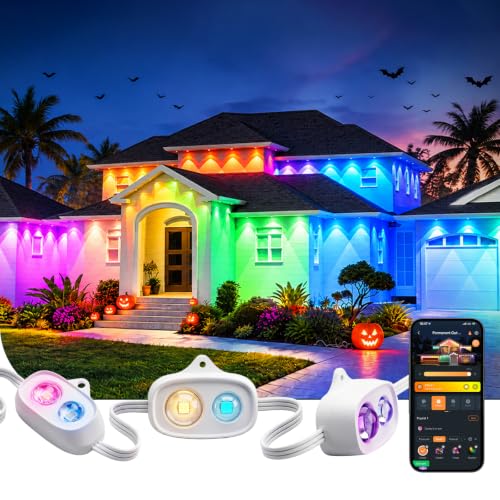
Each HP6 fitting has two downward-facing lenses. One produces a focused 50-degree beam, while the other spreads light across a wider 100-degree angle. The result is a smaller pool of light inside a broader wash of colour. Each zone can be set to its own colour or switched off independently, so you can change the shape of the light on the wall as well as its colour.


For Christmas, you could set the inner beam to red and the outer beam to green, or alternate the colours between neighbouring fittings. Once January rolls around, the same lights can give the front of the house a warm white glow. Linkind offers 16 million colours and a white temperature range of 1,800K to 6,500K, from a candle-like warmth to a crisp daylight white.
Installation and outdoor specs
Linkind offers the HP6 in 100ft and 200ft kits. The longer kit includes 120 lights, with a claimed maximum output of 12,000 lumens across the full run. The light strings are rated IP67 and the controller is rated IP65. The fittings use screws and 3M adhesive for mounting, and extension cables let you bridge gaps where you don’t want any lights.


The HP6 lights mount under the soffit and cast light down the wall. As you work along the roofline, use the included positioning card to place each fitting 2–4 inches from the wall. Drill a pilot hole and fit an anchor where needed, then peel the backing off the 3M VHB adhesive and press the fitting into place. A screw secures each light, with the adhesive providing extra support. The included cable clips keep the wiring tidy between fittings.
The light strings can’t be cut to length, but you can disconnect whole sections at the extension points to suit your roofline. You can also add more lights at those points or use the included extension cables to bridge areas where you don’t want any lights.
A single power adapter supports up to 12 strings, giving you 120 lights over 200ft with a claimed maximum output of 12,000 lumens. The light strings are rated IP67 and the controller is rated IP65. You’ll need a 2.4GHz Wi-Fi network to set up the lights in the AiDot app.
Presets and custom effects in the AiDot app
AiDot is where you choose what the lights look like. There are more than 120 presets covering holidays, parties and everyday lighting. If you want to make your own display, the DIY mode lets you build static or animated effects.

You can light both zones in every fitting, repeat the same zone across several fittings or alternate between the inner and outer beams. For example, you could keep a warm white glow along most of the house and bring in a second colour around the entrance. You can also use Linkind’s Dotis AI tool to generate an effect from a typed or spoken description, such as a slow red-and-white twinkle. AiDot also offers music sync and scheduling.
Using the HP6 in Apple Home
Once you add the HP6 to the Home app via Matter, you can switch the lights on and off from the app or ask Siri to do it. You can also include them in scenes with other accessories. A Christmas scene could turn on the roofline lights, the tree and the smart plug for the window decorations together. You could have that scene run at sunset, then use a separate automation to switch everything off later in the evening.
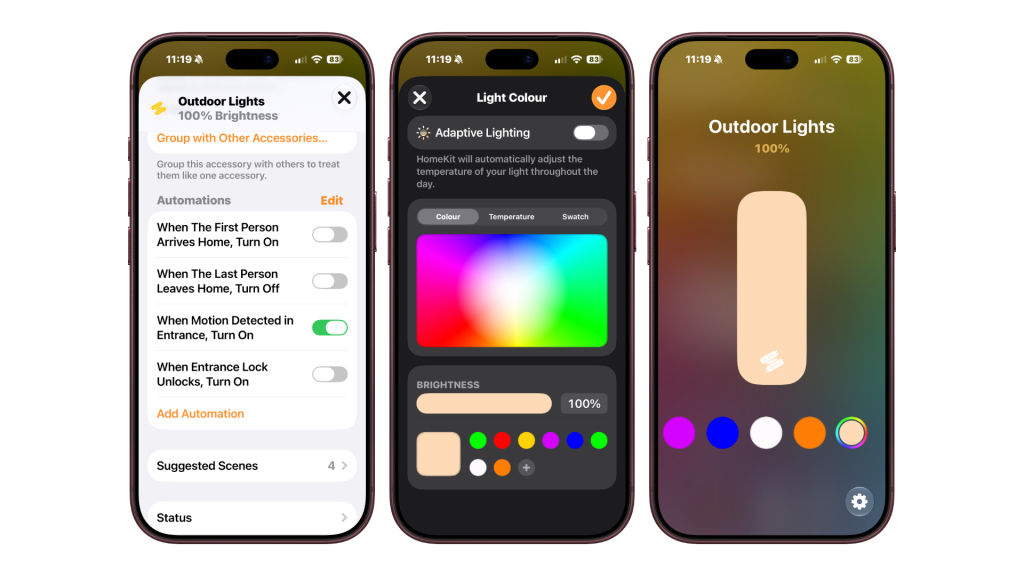
AiDot is where you pick the festive preset or adjust each beam. Apple Home lets you bring the lights into the same routines as the rest of the house. How I use mine with a motion sensor
I’ve set mine up so that after the lights have switched off for the night, an Apple Home automation turns them back on if my motion sensor in my doorbell detects movement at the front of the house. I can light the roofline in the evening, have it switch off at the usual time and still get some light out front when I need it out of those times.
First impression
In the time I’ve had the Linkind HP6 lights up, I’ve been impressed by how bright they are and how vibrant the colours look. The dual-lens design gives you room to experiment with how the light falls across the front of the house. You can use a stronger colour in the centre of each fitting and a softer shade around it, or go for two completely different colours when you want the roofline to stand out for Christmas.


So far, though, I’ve spent most of my time using the different white temperatures to light the front of my house. I can use a warmer white for a softer glow in the evening or switch to a cooler white when I want clearer light out front. Having that range makes the lights useful to me well beyond the festive season.
The Apple Home automation has also become part of how I use them. Once the lights switch off for the night, the motion sensor at the front of the house can turn them back on when it detects movement. I get some light when I need it without leaving the roofline lit all night.
These are still early impressions. I’ll go into more detail on the installation, the AiDot app and what the lights are like to live with over a longer period in my full review.
You can grab a set of the Outdoor lights from Amazon with a special launch price below

This post is in partnership with Linkind and the product was supplied by them